
Folders and search
Create an email folder
Create your own folder for emails and display it in the mailbox navigation if needed.
Requirement: After signing in, go to Email → Folder management.
Step by step
-
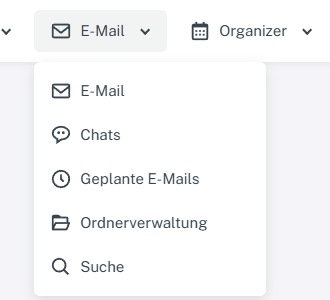
Click “Email” at the top; open “Chats” or “Folder management” in the menu. Click “Email” in the header and select “Folder management” from the menu. Click “Add folder” below the folder table.
-
Enter a unique title. Only select an existing folder under “Parent” if you want to create a subfolder.
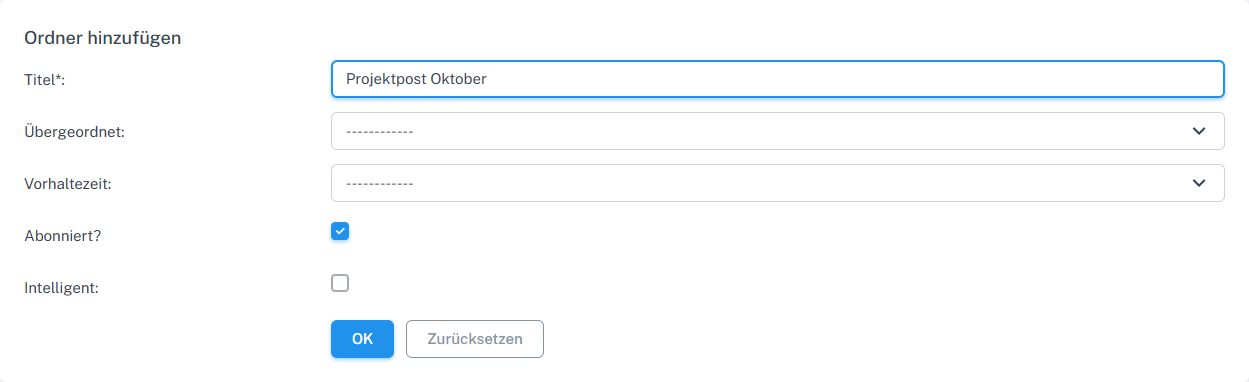
Add folder: set a neutral example name and optional properties. -
Only select a retention period if messages in this folder should be processed automatically after that period.
-
Leave “Subscribed?” enabled if the folder should appear in the mailbox navigation. “Smart” is intended for a rule-based folder.
-
Select “OK” and check the new entry under “My folders”.
What you will see afterwards
The new folder appears under “My folders”. If “Subscribed?” is enabled, it also appears in the mailbox navigation.
Common problems
- A title that is already in use or invalid may be rejected; use a different, unique name.
- If a folder is missing from the sidebar, check the “Subscribed?” option in folder management.
- Do not select a retention period if messages should remain in the folder permanently.