
Organizer
Create a task with a due date and priority
Add a task with a due date and priority to your list and find it again.
Requirement: You must be signed in and select a task list.
Step by step
-
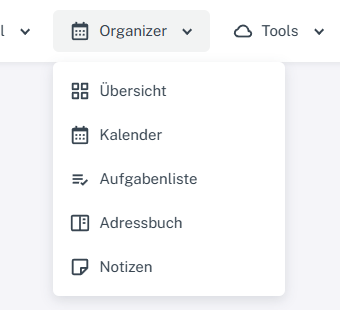
Click “Organizer” at the top and select Calendar, Task list, Address book, or Notes. Click “Organizer” in the header and select “Task list” from the menu. Select the destination list on the left, then “Add task” at the bottom of the task view.
-
Check the task list in the form and enter a title. Both fields are marked as required.
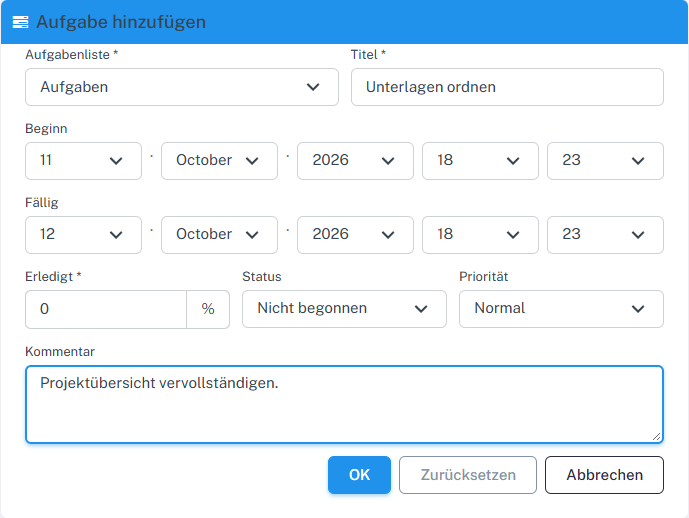
Check the list, title, dates, and other task details. -
Check the start and due dates. Add progress as a percentage, status, priority, and a comment if needed.
-
Confirm with “OK”. The list shows the new task under “Incomplete tasks”, with its title and due date.
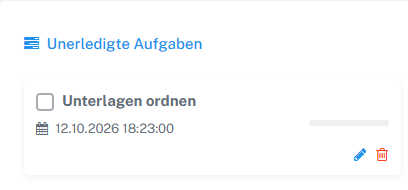
The new task appears in the selected list.
What you will see afterwards
The new task appears under “Incomplete tasks” in the selected list. Its due date is also shown there.
Common problems
- The progress value in the form is limited to between 0 and 100 percent.
- If the task is missing, check which task list was selected in the form.