
Folders and search
Sort folder management by title or subscription
Change the order of the displayed folder list.
Requirement: You must be signed in with folder management open.
Step by step
-
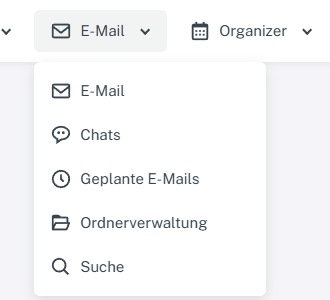
Click “Email” at the top; open “Chats” or “Folder management” in the menu. Click “Email” in the header and select “Folder management” in the menu.
-
Select the “Title” column heading to sort the management view by name. The arrow shows the direction.

Title with an upward arrow indicates ascending sorting in the management view. -
Alternatively, select “Subscribed” to arrange the view by subscription status.

Subscribed with a downward arrow indicates descending sorting. -
Click the same column heading again to reverse the sort order.
What you will see afterwards
Folder management shows the selected column and sort direction. Clicking the same column heading again reverses the order.
Common problems
- This guide describes the visible sorting in folder management; it does not guarantee a permanently saved personal folder order.
- Sorting the management view does not change folder names or contents.
Go to the relevant section of the “Getting started with Skymail” guide