
Webdisk and files
Create a new file in Webdisk
Create Word documents, Excel spreadsheets, OpenDocument files, and TXT files directly in the Webdisk folder you choose.
Requirement: After signing in with Webdisk access and enough free storage space and data transfer allowance.
Step by step
-
In webmail, after signing in, open Webdisk and switch to the folder where you want the new file to be created.
-
Click “New file” above the file list.
-
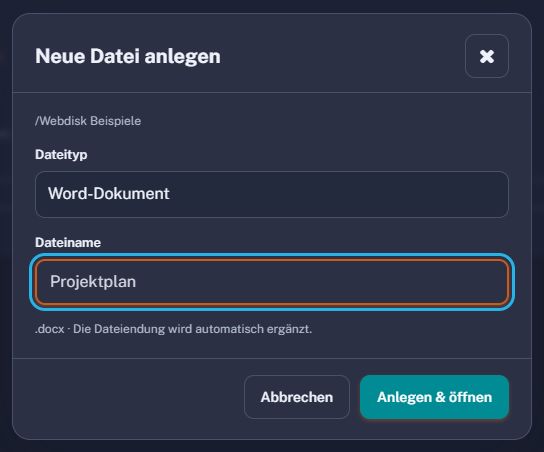
Use “New file” to create Word, Excel, OpenDocument, or plain text files in the open folder. Select Word document (DOCX), Excel spreadsheet (XLSX), OpenDocument text (ODT), OpenDocument spreadsheet (ODS), or text file (TXT). Enter a name; the appropriate file extension is added automatically.
-
Click “Create & open”. The new file is created in the selected folder and opened for editing.
-
Enter your content. “Save & return” updates this file and returns to Webdisk. “Save as copy” deliberately creates an additional file.
What you will see afterwards
The new file is in the selected Webdisk folder, where you can open it again later.
Common problems
- If the name is already used in the folder, choose a different file name.
- The file extension must match the selected type. For example, choose XLSX for an Excel spreadsheet.
- The file cannot be created if there is not enough storage space or data transfer allowance.