
Help and contact
Create a personal Premium ticket
Create a private support request with a subject, category, and priority in your signed-in account.
Requirement: Only after signing in, if personal Premium support is enabled for your account.
Step by step
-
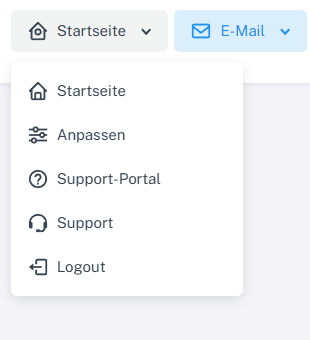
Click “Home” at the top, then select “Support” with the headset icon. “Support portal” opens public help. Sign in to webmail. Click “Home” in the header, then “Support” with the headset icon in the menu. “Support portal” directly above it is the public help, not your private ticket view.
-
Under “New ticket”, enter a clear subject and select an appropriate category and priority.
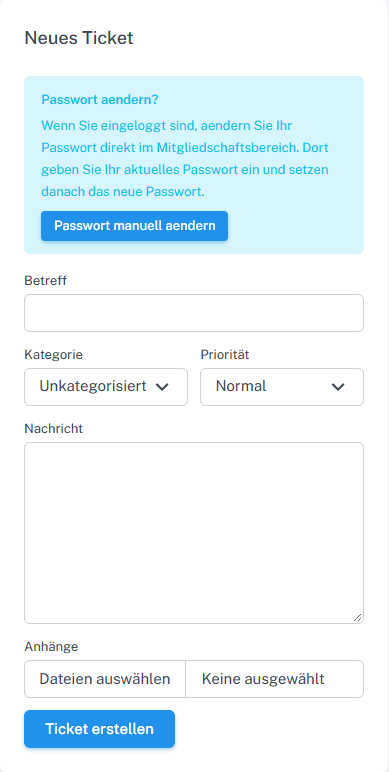
Complete “New ticket” in the private support area. The image shows the empty form without personal details. -
Describe your issue in the message field and add suitable attachments if needed.
-
Select “Create ticket”. The ticket appears under “My tickets” on the right; use “Ticket number or subject” to search for and open it.

After creation, your ticket appears under “My tickets”. You can search by number or subject there.
What you will see afterwards
If creation succeeds, the ticket is assigned to the signed-in account and appears in its private ticket list.
Common problems
- If “Support” is missing or access is denied, personal Premium support may not be enabled for your account.
- The public contact form and public recovery tickets have separate access and cannot view private tickets.
- To change your password while signed in, use the corresponding settings area.