
Help and contact
Download an attachment from a personal ticket
Retrieve a file from your own private support history.
Requirement: After signing in with personal Premium support enabled, a ticket of your own, and an existing attachment.
Step by step
-
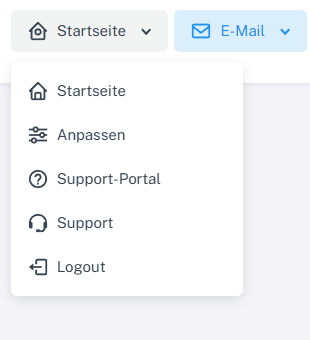
Click “Home” at the top and open the private “Support” area. In signed-in webmail, click “Home” at the top, then “Support” with the headset icon in the menu. Open your own ticket under “My tickets” on the right.
-
Find the “Attachments” section of the relevant message in the message history.

The filename appears under “Attachments” in the message history and opens the download. -
Select the filename and confirm the download in your browser if prompted.
-
Only open the downloaded file with an appropriate application, and check its content and origin.
What you will see afterwards
The browser downloads the attachment from your own ticket if you are signed in and have permission to access it.
Common problems
- An attachment from someone else's ticket or from a public ticket cannot be retrieved through private account access.
- If the link does not work, sign in again and open the ticket directly in webmail.