
PDF tools
Fill in PDF form fields
Fill existing PDF form fields using their field names.
Requirement: Publicly accessible without signing in at /en/pdf-tools and the respective tool page
Open the relevant PDF tool
Step by step
-
On the skymail.de home page, scroll to the footer. Under “Support”, click “PDF Tools” (see screenshot). In the PDF overview, select “Fill forms”.

Scroll to the bottom of the SkyMail home page and click “PDF Tools” under “Support” in the footer. -
Select a PDF file with existing form fields, up to 20 MB.
-
In “Form values”, enter one line per field in the format “FieldName=Value”. Use the exact field names in your PDF; an arbitrary name will not fill a different field.
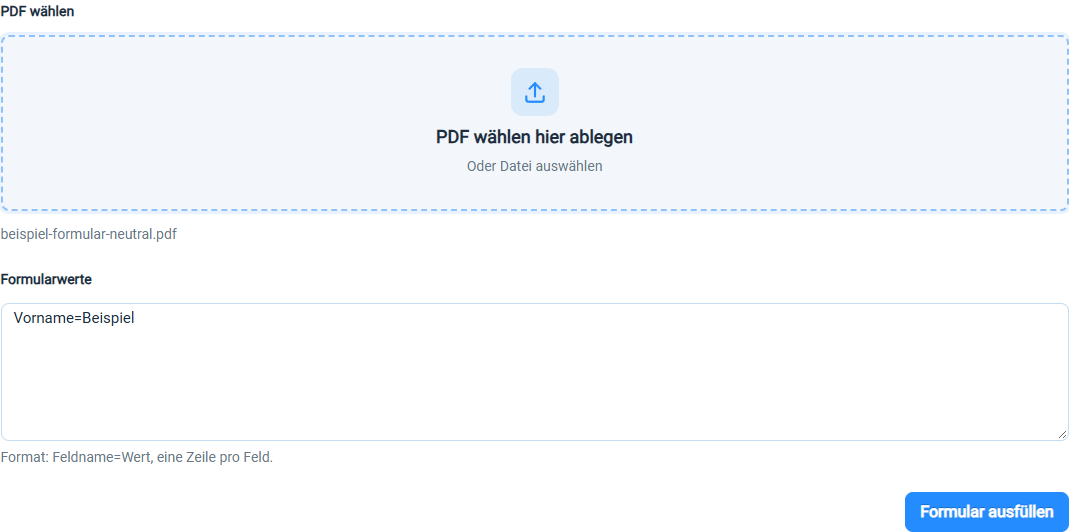
For each existing PDF form field, enter its field name and the desired value. -
Click “Fill form”. The success banner offers the download; the input below is cleared for a new run. Download the new PDF and check every value.

The download link appears after processing. The input below is cleared for a new run.
What you will see afterwards
The entered values appear in the new PDF. The filled fields are generally no longer interactively editable in that file, so check all values before sharing it.
Common problems
- No result is created without valid entries in the format “FieldName=Value”.
- Misspelled field names may leave fields empty.
- The page currently does not list detected field names; identify them in the source document.