
Folders and search
Narrow mailbox search with filters
Set the search area and date range for a mailbox search.
Requirement: You must be signed in with the search view open.
Step by step
-
Click “Email” in the header, then “Search” in the menu. Enter a term under “Search for” on the left.
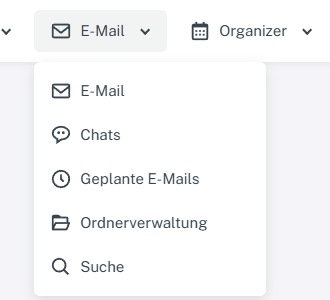
Click “Email” at the top, then “Search” in the menu. -
Use the checkboxes under “Search in” to select the areas you want. Disable “Web search” if you only want to see content from your mailbox.
-
If needed, set the “from” and “to” date range using the day, month, and year fields.
-
Select “Search” and check the selected filters in the form and the number of matches.
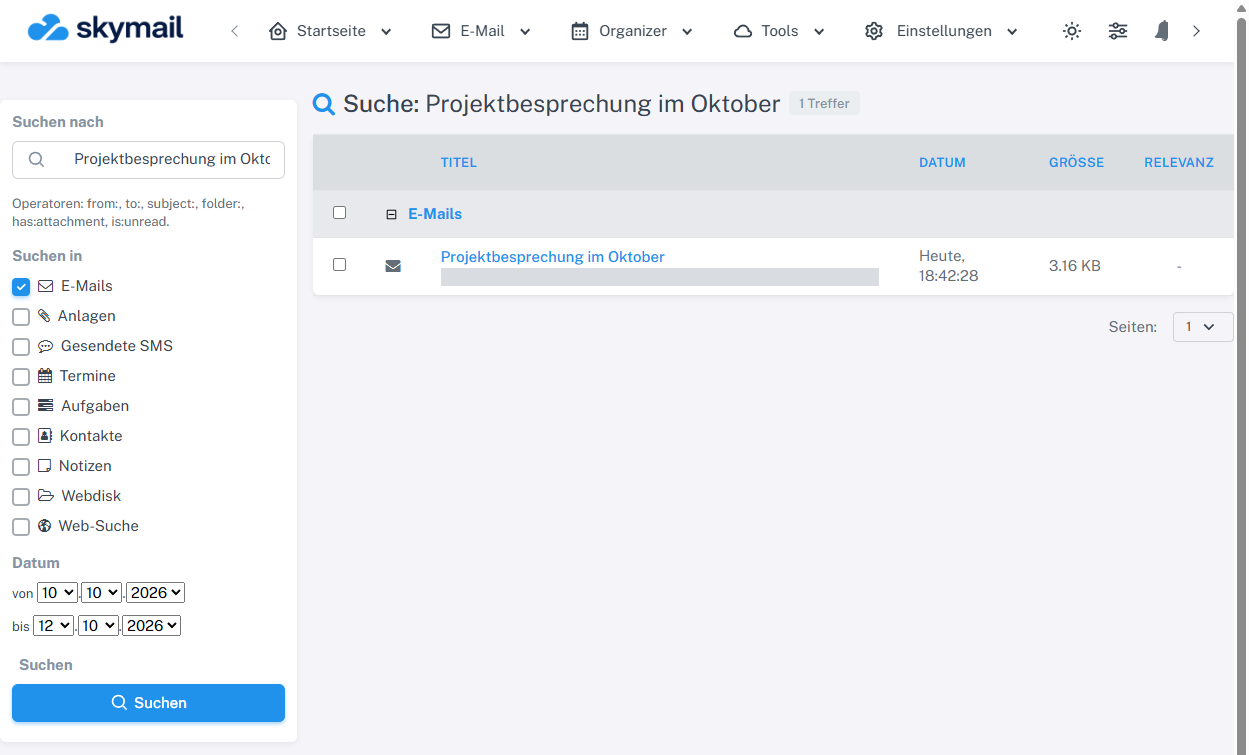
The search area and date limits remain visible beside the single matching item.
What you will see afterwards
The result list takes the selected areas and date limits into account. The filter values remain visible in the form so you can adjust them.
Common problems
- If expected results are missing, check the search term, area checkboxes, and both date limits.
- In the account checked, setting both the start and end date to 11 October 2026 returned no result for an existing draft. Without a date filter there was one result, and there was also one with 10–12 October 2026. Until a fix has been verified on this website, first remove the date limits and search again if results are missing.
Go to the relevant section of the “Getting started with Skymail” guide