
Help and contact
Open the support portal from webmail
Open the public help from signed-in webmail.
Requirement: A signed-in webmail account is needed for this entry point; the support portal itself is public.
Step by step
-
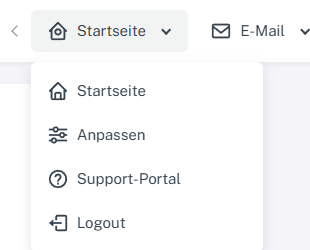
Click “Home” at the top, then “Support portal” in the menu. In signed-in webmail, click “Home” in the header. Select “Support portal” from the menu.
-
The public support portal opens in a new browser tab at skymail.de/en/help/. You do not need to sign in again to read it.
-
Search for an article or open a category there. Return to the webmail tab when needed.
What you will see afterwards
The public support portal is open, without creating a personal ticket.
Common problems
- If the new tab does not appear, check your browser's popup or tab blocker.
- Personal Premium support is a separate area with its own access permissions.
Go to the relevant section of the “Getting started with Skymail” guide