
Read and write emails
Select emails and use the selection bar
Select messages using checkboxes and find the available bulk actions.
Requirement: You must be signed in, with at least one editable message in the open folder and visible selection checkboxes.
Step by step
-
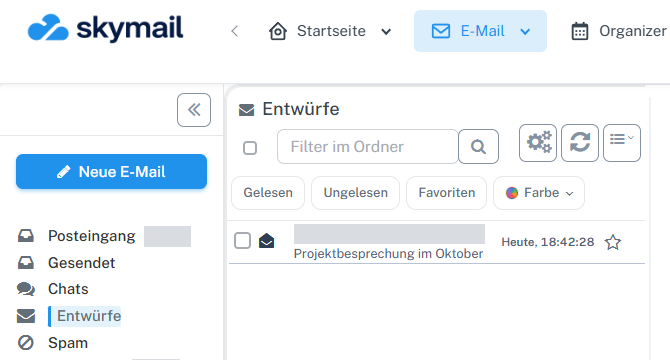
Click “Email” at the top and “Inbox” or the desired folder on the left. Click “Email” in the webmail header and “Inbox” or the folder containing the desired messages on the left.
-
Tick the checkbox beside a message. The selected row is highlighted.
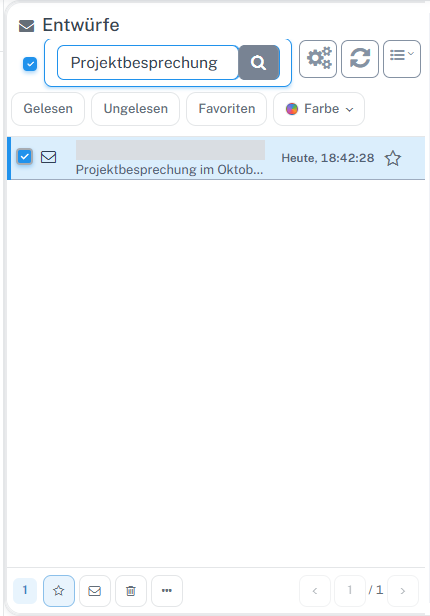
Tick the checkbox beside the message. The selection bar with actions appears at the bottom. -
Check the selection bar at the bottom: it shows the number of selected emails and actions including “Favorite”, an envelope icon, “Move”, a trash icon, and further actions under “…”.

After selection, the counter and action buttons appear in the bar. -
Check the selected rows before every bulk action. Separate guides explain “Favorite” and the read status.
What you will see afterwards
The selected message is highlighted. The selection bar shows how many messages are selected and which bulk actions are offered.
Common problems
- Check the selection carefully before confirming a move or delete action.
- Some actions are unavailable in read-only folders.
Go to the relevant section of the “Getting started with Skymail” guide