
More tools
Open chats in webmail
Open your own chat overview from the Email menu.
Requirement: A signed-in account with chat enabled.
Step by step
-
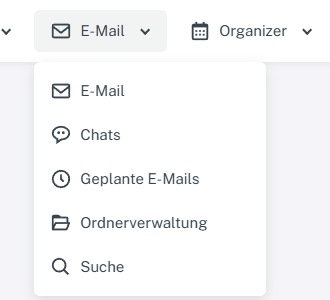
Click “Email” at the top; open “Chats” or “Folder management” in the menu. Sign in to webmail and click “Email” in the header.
-
Select “Chats” there. The chat overview shows search and the button for starting a chat on the left.

Chat overview opened from the Email menu, with a search field and plus sign. -
Select a conversation from the list to display its history.
What you will see afterwards
Use the “Email” menu to open the chat overview. The identically named entry in the mailbox folder list leads to a folder view instead.
Common problems
- If “Chats” is missing from the Email menu, chat may not be enabled for the account.
- The search and start chat buttons are part of the chat overview; their individual processes are explained separately.
Go to the relevant section of the “Getting started with Skymail” guide