
Read and write emails
Use swipe gestures in mobile webmail
Use a swipe gesture in mobile webmail to mark a favorite or move a message to the trash.
Requirement: Classic webmail in a touch browser no more than 768 CSS pixels wide, with an editable email in the list.
Step by step
-
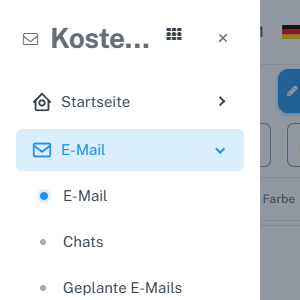
Tap “Menu” at the top left and the “Email” subitem in the “Email” section. In mobile webmail, tap “Menu” at the top left, select the “Email” subitem in the expanded “Email” section, and use “Folders” to open the desired email folder. Touch an empty area of a message row. Buttons, checkboxes, and links in the row have their own actions.
-
Swipe the message to the right until “Favorite” is displayed. A short, canceled swipe changes nothing.

While swiping right, the list shows the “Favorite” action. -
Release and check the star. Swiping right again removes the favorite mark; the status is retained after reloading.

After releasing, the star shows the saved favorite mark. -
Swipe a message to the left until “Delete” is displayed. Outside the trash folder, releasing moves the message to the trash.

While swiping left, the list shows the “Delete” action. -
Check the notification after releasing. If the action was unintended, immediately select “Undo” to return the message to its previous folder.

The message was moved to the trash; “Undo” restores it. -
Then check the favorite status or folder. Use the visible buttons if the gesture does not respond on your device.
What you will see afterwards
In classic mobile webmail, swiping right toggles the favorite status. Swiping left moves a message from a regular folder to the trash. The area for additional accounts and the native app may use different gestures.
Common problems
- The gestures work only with touch input and at browser widths up to 768 CSS pixels. A narrow desktop browser without touch input does not activate them.
- Vertical scrolling and short swipes do not trigger an email action.
- Actions may differ or be absent for drafts and read-only messages.
Go to the relevant section of the “Getting started with Skymail” guide